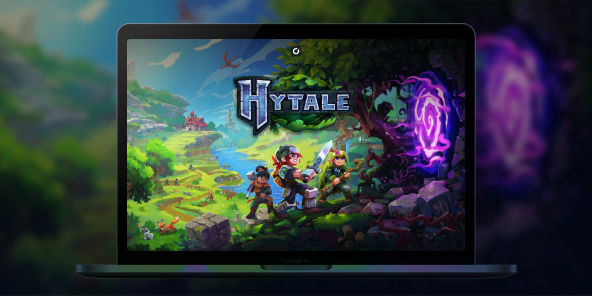
How to create or join Hytale servers?
Want to create or join servers and play with your friends on Minecraft's concurrent game? With Shadow PC, you stream a full Windows gaming PC and you can play the official Windows version of Hytale, even if your setup is limited. Team up with friends for multiplayer adventures, join community worlds, or build your own private server.

Play Hytale online with Shadow PC
Shadow PC is a high end Windows gaming PC in the cloud. Install Hytale like you would on a regular PC. Play with a smooth streamed experience and jump into multiplayer coop adventures.
CPU AMD EPYC de 8 núcleos (3,25 GHz); 16 GB de RAM; GPU NVIDIA RTX 2000 Ada de 16 GB (GPU de clase GeForce RTX 4060); SSD de 512 GB
CPU AMD EPYC de 8 núcleos (hasta 3,7 GHz); 28 GB de RAM; GPU NVIDIA RTX A4500 de 20 GB (GPU de clase GeForce RTX 3070 Ti); SSD de 512 GB
Hytale: a Minecraft-like sandbox survival experience
Hytale mixes a block based sandbox with RPG flavored exploration. It is built for adventurers, builders, and creators who want a world that feels alive, full of secrets, and shaped by the community.
Mods and servers that feel effortless to join
Hytale is designed around a server first philosophy: even single player is treated like joining a local server. The goal is simple for players: join a server without fighting with separate client mod packs, and let servers shape the experience.
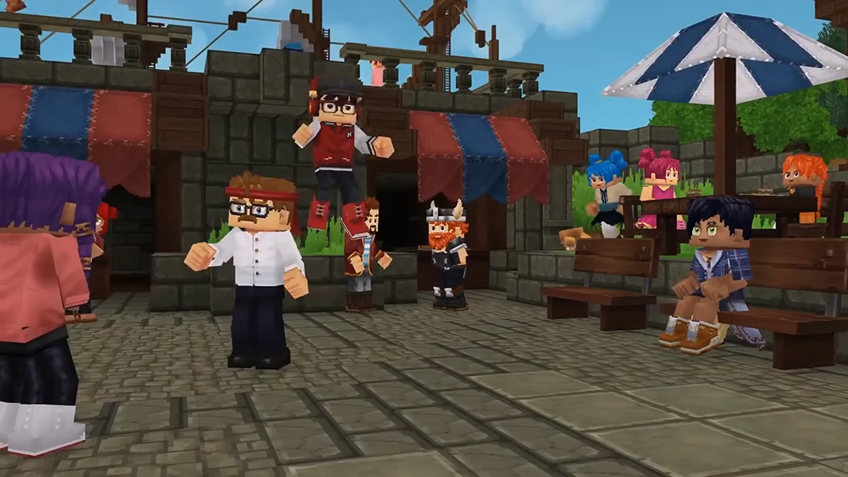
How to play Hytale online with friends?
Online play in Hytale revolves around one thing: servers. In just a few clicks, you can jump into a public server with other players, or set up a private space reserved for your own group.
Hosting a public Hytale server
If you want to run your own public server, you have several hosting options available, with pricing tiers to suit different budgets and player counts.
To help you compare providers, we recommend starting with this article to the best Hytale server hosting services:
https://www.hostinger.com/tutorials/best-hytale-server-hosting-providers
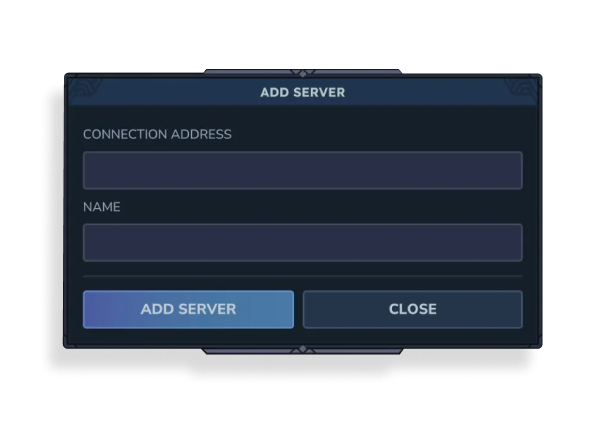
If you prefer joining servers that already exist, just open the Servers menu, click Add Server, then enter the server’s Connection Address and assign it a name. You’ll be connected in seconds.

Creating a private server (friends-only)
If your goal is simply to play with friends and not with strangers, you can create a private multiplayer session instead.
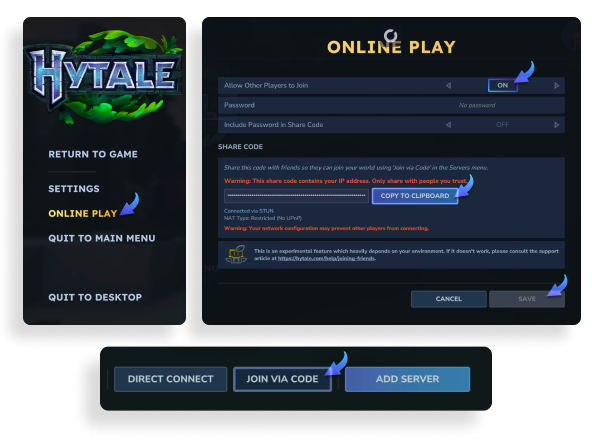
To set up a private peer-to-peer server, go to the Worlds tab and choose the mode you want: Adventure, Exploration, or Creative. Name your world and adjust any settings to match your preferences. Once the world is running, press Escape, open Online Play, and make sure Allow Other Players to Join is turned On. You can optionally add a password, then click Save.
The game will then generate a join code. Click Copy to Clipboard and send it to your friend(s). On their side, they’ll need to go to the Servers tab, select Join via code, paste the code, and connect.
Installing mods to enhance your experience
WIth Shadow PC, since you have access to a full Windows PC, you can even install mods to expand and improve your gameplay.
Start by visiting:
https://www.curseforge.com/download/app
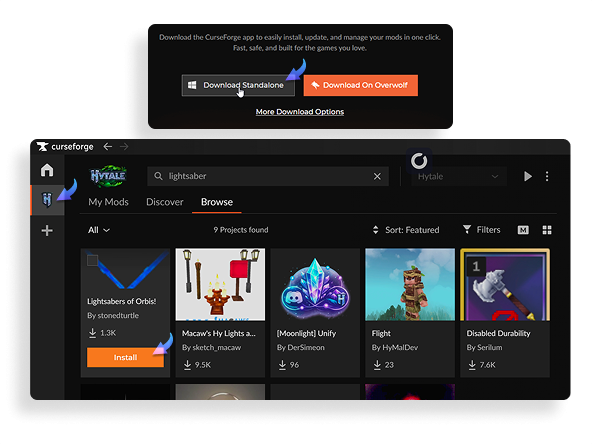
Download and install the CurseForge app. Once it’s open, add Hytale from the left-hand sidebar (if it isn’t already listed), then browse the available mods. When you find one you like, simply click Install.
After installation, your mod should appear in the My Mods tab. From there, simply launch the game via its official launcher and you’re ready to play.
Turn any of your device into a gaming PC in just a few clicks!
Whether you're on a Mac (with few games compatible with macOS), a Linux machine (where Windows emulation hurts performance), or an older PC (one with an underpowered graphics card), Shadow gives you access in just a few clicks to a powerful gaming PC to install all your favorite games*!

Choose the plan that best fits your needs.


Launch Shadow, Hytale, and start playing. It’s that simple!
Your gaming PC, anytime, anywhere
Connect to your high-performance Shadow PC and play Hytale along with all your favorite titles on any device, whether it’s an iPhone, iPad, mobile tablet, Windows or Linux computer, Meta Quest, or just your web browser. Benefit from a smooth, dependable, and ultimate cloud gaming service wherever you go, and elevate your gaming sessions with the unmatched power of Shadow PC.

FAQ
Join the same server. You can pick a public server, or set up a private server and share the address with your group. Servers can be vanilla or modded, so agree on a server style before you start.
Yes. You can host a private server for friends, then share the connection details. For a server that runs all day, use a dedicated hosting option and keep regular backups.
Yes, servers are a core part of the modding vision. Many community servers will offer custom rules, content, and experiences, so check each server description before joining.
Shadow es un completo PC para juegos con Windows alojado íntegramente en la nube. Es la única máquina virtual cuyo rendimiento rivaliza con el de un PC local. Y, a diferencia de los servicios de juegos en la nube, puedes instalar y ejecutar cualquier juego, aplicación o software: no hay catálogo restringido.
Tu Shadow es una auténtica estación de trabajo profesional con Windows. Instala todo lo que necesites*: Adobe Suite, herramientas CAD, entornos de desarrollo, etc.
Sí, tanto la aplicación Shadow como la versión para navegador funcionan en la mayoría de las versiones recientes de macOS y en ordenadores compatibles.
Para cada terminal que elija, podrá descargar de forma gratuita el software cliente Shadow PC; entre otras cosas, podrá poner a prueba la calidad de la navegación o ajustar los parámetros de la calidad de vídeo, para llegar incluso a la más alta resolución, como el 4K. Cuando precise acceder de forma rápida desde un nuevo terminal o estación de trabajo con restricciones para la instalación de software, ahora podrá disfrutar de un acceso directo a su PC Shadow desde un explorador. Sin necesidad de realizar instalación alguna, resulta rápido y sencillo: solo tiene que visitar la página pc.shadow.tech. Este modo de acceso resulta muy práctico para fines de demostración o formación sobre su contenido, a través de un programa de software exigente directamente desde la estación de trabajo de sus clientes y clientes potenciales: no hay necesidad de transportar el terminal, el software y los datos, accede a ellos con total facilidad.
Sí, cuando usas Shadow, obtienes una velocidad de descarga de hasta 1 Gb/s, incluso si tu conexión en casa es más lenta.
En resumen: no. Proporcionamos potencia suficiente para satisfacer sus necesidades según la oferta elegida. En cuanto a la latencia, nuestra tecnología avanzada permite utilizar una conexión con poco ancho de banda (a partir de 15 Mb/s) ofreciendo una latencia prácticamente imperceptible. Por supuesto, la compresión puede afectar la calidad de imagen, y si su conexión es demasiado lenta, podrá notar la diferencia respecto a la imagen original.
Sí, Shadow no limita la resolución y permite ejecutar Windows, sus juegos y programas en 4K UHD. Tenga en cuenta que algunos juegos podrían no admitir 4K o podrían tener un rendimiento inferior con esta resolución. Además, una resolución así requiere mayor ancho de banda, por lo que necesitará una conexión a Internet más rápida y estable que con resoluciones más bajas.
Sí, puede activar una segunda pantalla directamente desde el Menú Rápido de su PC Shadow.