How to run OpenClaw AI agents with no API bill
OpenClaw is the fastest-growing open source project in GitHub history: an autonomous AI agent that handles your email, your calendar, your files and your projects on its own. To do that, it needs a separate environment with a GPU of its own. That is exactly what a Shadow PC is.
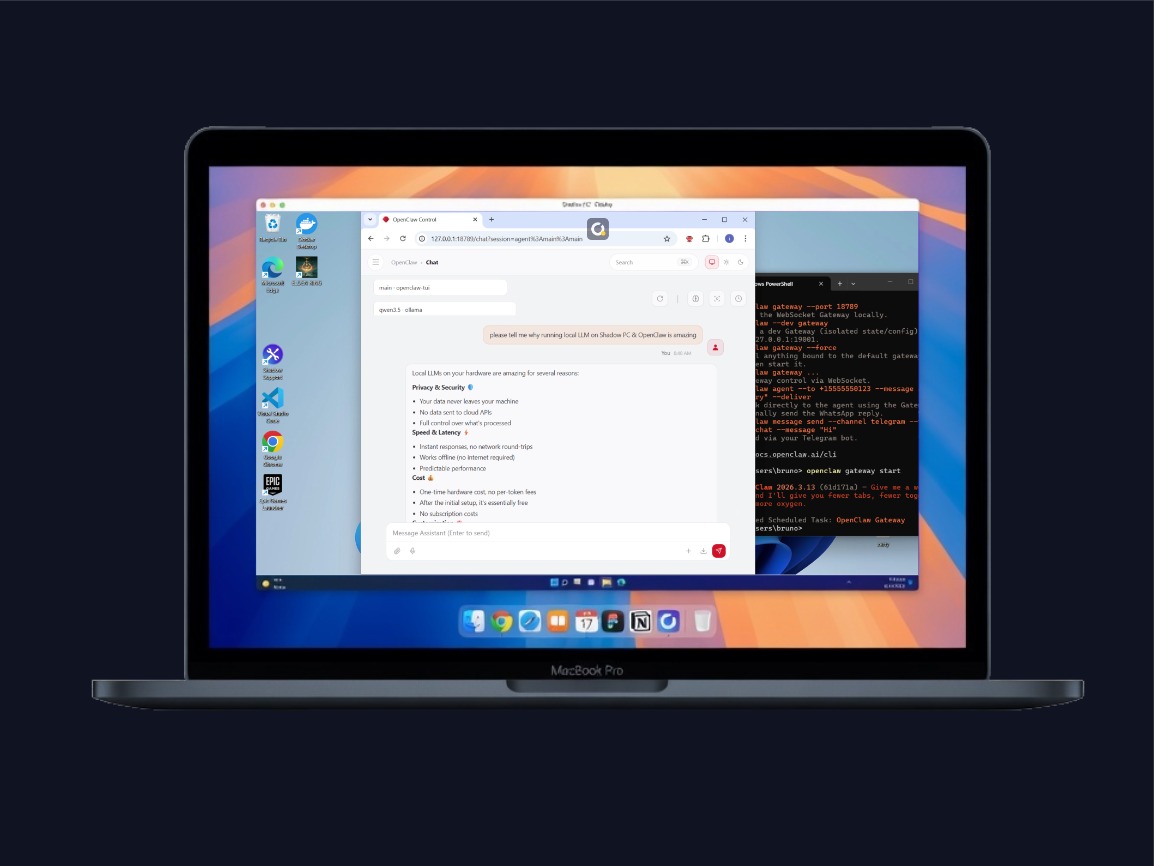
Your agent gets a machine of its own: a Windows PC in the cloud with a dedicated GPU, separate from your personal computer. With a local model, your prompts stay on that machine instead of going to a cloud API.
What is OpenClaw?
OpenClaw (formerly Clawdbot, then briefly Moltbot after an Anthropic trademark complaint) is an open-source AI agent created by Austrian developer Peter Steinberger in late 2025. Unlike traditional chatbots that only respond, OpenClaw acts autonomously: it reads your emails, drafts contextual replies, manages your calendar, monitors GitHub projects, browses the web, executes code, and communicates via WhatsApp, Telegram, or Discord.
On March 3, 2026, OpenClaw overtook React as GitHub's most-starred software project, a little over three months after its launch. It has since passed 390,000 stars, and the project is now stewarded by the OpenClaw Foundation, an independent non-profit. NVIDIA CEO Jensen Huang has called it "the operating system for personal AI."
Autonomous management of emails, calendar, files, and projects
Reachable via Telegram, WhatsApp, Discord, Slack, iMessage
Works with cloud models (Claude, GPT) and local models (Ollama, LM Studio)
Persistent memory: learns your preferences over time
100+ integrations: Notion, GitHub, Gmail, smart home, Spotify, and more
Note: OpenClaw and its more secure version Nemoclaw are powerful, fast-evolving, alpha products. APIs, configuration schemas, and runtime behavior may change between releases. These software can brick your Shadow PC & potentially put your personal data at risk. Only use if you know how to use it, and prevent OpenClaw from accessing any sensitive data.
What OpenClaw actually does for you
Emails sorted and answered, calendar managed, projects monitored, tasks scheduled. OpenClaw works while you focus on other things.
With a local model served by Ollama or LM Studio, inference runs on your Shadow PC's GPU instead of a third-party API.
With a local model running on GPU, you eliminate cloud API fees. The cost is fixed, regardless of how many requests your agent makes per day.
OpenClaw remembers your preferences, projects, and habits. It improves with every interaction and accumulates context over time.
Gmail, Slack, Notion, GitHub, Spotify, smart home, Telegram, Discord, WhatsApp, iMessage, OBS, plus a growing ecosystem of community "skills."
OpenClaw can create its own skills, orchestrate other agents (Claude Code, Codex), and even modify its own configuration autonomously.
Give your agent a machine of its own
The idea is simple: your Shadow PC becomes the computer your OpenClaw agent runs on. A full Windows PC in the cloud, separate from your personal machine, with its own NVIDIA GPU and 1 Gbps download speed.
Separation limits the damage. Your personal files, the passwords saved in your browser and your online banking stay on your own computer, not on the machine the agent works on. If something goes wrong, you reset the Shadow PC, and your personal computer is left untouched.
The dedicated GPU ends your dependence on cloud APIs. With 20 GB of dedicated VRAM and 28 GB of RAM on Power and Power Pro, you run models like Qwen3.5 27B, Mistral Small 3.2 24B or GPT-OSS 20B right on your Shadow PC. Your prompts are then processed there, not by a third-party API.
Good to know: without the Always On option, your Shadow PC shuts down after a period of inactivity and at the end of a session, even if a program is still running. Your files survive that, a running agent does not. Always On is available on the Shadow PC Pro range: your Shadow PC stays powered on 24/7, even when you are not connected. It is a paid option, billed for the full calendar month.
How Shadow PC compares for running an agent
The options for running an autonomous AI agent, side by side.
| Shadow PC | Local Mac Mini | Standard VPS | OpenClaw Cloud | |
|---|---|---|---|---|
| Dedicated GPU (local LLM) | ||||
| Isolation from personal computer | ||||
| Full graphical interface (GUI) | Limited |
|||
| Always On (24/7) | Paid option, Pro range |
Manual setup |
||
| Built-in 1 Gbps fiber | Varies |
Varies |
||
| Multi-purpose (gaming, work...) | ||||
| Zero hardware investment |
Which Shadow PC for your agent
Every plan runs OpenClaw. To keep your agent running after you log off, choose the Shadow PC Pro range with the Always On option.

Neo Pro
For the first six months, £39.99 after.

 Everyday AI on a PC that can stay on with the Always On option
 Your assistants and local models, always at handThe Always On option keeps it running while you are awayPriority access & Longer sessionsYour models and prompts stay on your disk
-
GPU Geforce RTX 4060 16GB - class (RTX 2000 ADA 16 GB)
-
AMD EPYC 8 vCores - 3.25 GHz
-
16 GB of RAM
-
256 GB SSD + 512 GB HDD
-
D:\ Up to 5 TB HDD available as an option
-
Windows 11 Home/Enterprise*
-
1Gbps / 100Mbps

Power Pro
For the first six months, £52.99 after.
Heavy models and ComfyUI renders
 Your games installed on the same PCThe fastest local models of the rangeComfyUI renders without the waitThe Always On option for agents and long jobsPriority access & Longer sessions
-
GPU Geforce RTX 3070 Ti 20GB - class (RTX A4500 20GB)
-
AMD EPYC 8 vCores (up to 3.7 GHz)
-
28 GB of RAM
-
256 GB SSD + 512 GB HDD
-
D:\ Up to 5 TB HDD available as an option
-
Windows 11 Home/Enterprise*
-
1Gbps / 100Mbps
Getting started with OpenClaw
Local AI models that run well with OpenClaw on Shadow PC. Selection and sizes (Q4_K_M, Ollama library) as of September 2026.
Neo Pro
Recommended models
- Qwen3.5 9B 6.6 GB, Q4_K_M
- DeepSeek-R1 14B 9 GB, Q4_K_M
- Gemma 4 E4B 9.6 GB, Q4_K_M
- GPT-OSS 20B 14 GB, Q4_K_M
Power Pro, 20 GB of VRAM
Recommended models
- Qwen3.5 27B 17 GB, Q4_K_M
- Mistral Small 3.2 24B 15 GB, Q4_K_M
- GPT-OSS 20B 14 GB, Q4_K_M
- Gemma 4 E4B 9.6 GB, Q4_K_M
- DeepSeek-R1 14B 9 GB, Q4_K_M
- Qwen3.5 9B 6.6 GB, Q4_K_M
Questions about OpenClaw on Shadow PC
Yes, with the Always On option on the Shadow PC Pro range: your Shadow PC stays powered on 24/7, even when you are not connected, so the agent keeps running its tasks while you are away. Without that option, on any range, the machine shuts down after a period of inactivity and at the end of a session. Your files are still there when you come back, but a task that was mid-flight is not.
Not if the model runs locally. OpenClaw works with cloud models such as Claude or GPT, which bill per token, and with local models served by Ollama or LM Studio, which bill nothing at all. On a Shadow PC the local model runs on the dedicated GPU, so an agent that makes a thousand calls a day costs the same as one that makes ten. What you pay for is the machine, not the traffic.
Our offers page puts the ceiling at 32B, quantised to Q3 or Q4. That covers the local models people pair with an agent today, such as Qwen3.5 in its 9B and 27B versions, Gemma 4 E4B, DeepSeek-R1 14B, GPT-OSS 20B or Mistral Small 3.2 24B. The largest ones call for the 20 GB of VRAM on Power and Power Pro. Since the PC is a normal Windows machine, you install Ollama or LM Studio yourself and pick whatever you want from their catalogues.
Not without precautions. An autonomous agent reads files, browses the web and runs code, and on your personal computer it does so next to your passwords, your banking sessions and your work documents. On a Shadow PC it runs on a separate Windows machine: your personal computer stays out of reach, and if the agent breaks something, you reset the Shadow PC. That separation does not cover the accounts you connect to it: an email it sends or deletes stays sent or deleted. Give it only the access it needs, and read the warning above before you start: OpenClaw is still young and changes fast.
Your content is never used by Shadow to train models, we do not have access to your prompts, and no history is stored on our end. Shadow is GDPR compliant. The agent runs in software you installed on your own Windows desktop, and the files it reads and writes stay on your Shadow PC's storage. What it sends to the online services you connect, such as your mailbox or a cloud model, follows those services' rules.
Without Always On, your agent runs only during your sessions, and those count toward the monthly fair use: 120 hours on Shadow PC Lite, 210 hours on Shadow PC and Shadow PC Pro. The Always On option on the Shadow PC Pro range keeps the machine powered on 24/7, even when nobody is connected: that is what makes a continuously running agent possible. It is a paid option, billed for the full calendar month.